

Adblue OBD2 Emulator for MercedesBenz Trucks
- Short Description
- Original / Non-original: The product is A+ quality and tested by our team before shipment.
- Warranty: 30 Days Replacement
- Replacement Policy: Video and images must be provided
- 100% Perfect Fit
- Protective Packaging: Ensures the product doesn’t get damaged during transportation
- Lowest Price Guarantee + Highest Margins
- Minimum Order Quantity: 1 piece
- Delivery Time: 7–14 Days
Best Online Shopping Site for Your Business - Wholesale Enquiries: WhatsApp: 9266900809
Note: Limited stock. Due to high demand, your order may ship from our overseas warehouse, which could add 10–14 days to delivery. Tracking will be shared once it reaches our Indian warehouse.
Product Description
|
Welcome to Touchlcdhouse.com
Fixing your phone is a breeze with us. Whether you've got a cracked screen or a tired battery, we've got all the genuine parts you need, no matter your phone's brand or model. |
|||
|
Adblue OBD2 Emulator for MercedesBenz Trucks
|
|||
| 1 | 1. ADBlueOBD2 is very easy to install. Just Plug it into OBD2 connector of truck or bus and remove the fuses mentioned. | ||
| 1 | 2. ADBlueOBD2 will override ADBlue system instantly, it will stop the usage of adBlue liquid and disable Nox sensors. | ||
| 1 | 3. Without any power loss of the engine or any warnings on the dashboard and in diagnostic system. | ||
| 1 | 4. ADBlueOBD2 does not damage the engine and not cause any negative effects to the truck factory setting. | ||
| 1 | 5. ADBlueOBD2 does not change any of the settings permanently. To turn back to the truck original settings, just unplug adBlueOBD2 from OBD2 connector. | ||
| 1 | 6. It is a Plug&Drive Ready device to mulate working adBlue systems and NOx sensors on trucks, which equipped with EURO 4/5/6 catalytic converter systems, even with damaged adBlue SCR system. | ||
| 1 | 7. Fits for Mercedes-Benz Trucks. | ||
| 1 | 8. Installation and Calibration for BENZ Trucks: | ||
| 1 | - Pull the Key out from the ignition | ||
| 1 | - Remove the following Fuses (For MERCEDES BENZ) F1 | ||
| 1 | - Plug AdblueOBD2 into OBD2 connector | ||
| 1 | - Turn on the ignition and check the level of adBlue, if it shows 50% or 70% | ||
| 1 | - If any fault light appears on dashboard, delete via service scanner | ||
Note: This product is in limited stock, and due to high order volumes, it may occasionally ship from our international or overseas warehouse. In such cases, delivery can take an additional 10 to 14 days. Once the product reaches our Indian warehouse, we will promptly share tracking details with you.
We Take Special Requests For All Mobiles, Tablets, And Parts, Even If They're Not Available In Our Online Store.
Please Click Below to Chat with Us on WhatsApp

When you order from touchlcdhouse.com, you will receive a confirmation email. Once your order is shipped, you will be emailed the tracking information for your order's shipment.
The total time it takes to receive your order is shown below:
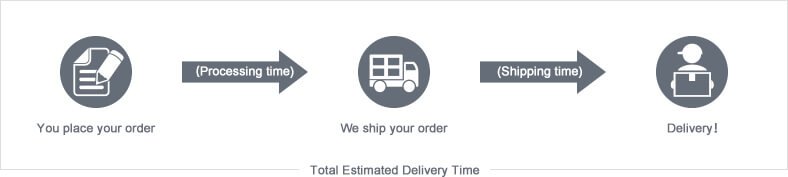
The total delivery time is calculated from the time your order is placed until the time it is delivered to you. The total delivery time is broken down into processing time and shipping time.
Processing time: The time it takes to prepare your item(s) to ship from our warehouse. This includes preparing your items, performing quality checks, and packing for shipment.
Shipping time: The time for your item(s) to travel from our warehouse to your destination.
Shipping from your local warehouse is significantly faster. Some charges may apply.
In addition, the transit time depends on where you're located and where your package comes from. If you want to know more information, please contact customer service. We will settle your problem as soon as possible. Enjoy shopping!